
Your procurement teams shouldn’t be drowning in repetitive workflows.
From vendor reconciliation to inventory planning, Digital Workers automate the workflows that keep your business moving; cutting costs, reducing disputes, and boosting resilience.
Customers automating their workflows













Pain Points Procurement Leaders Recognise:
Simple Requisitions Take Weeks
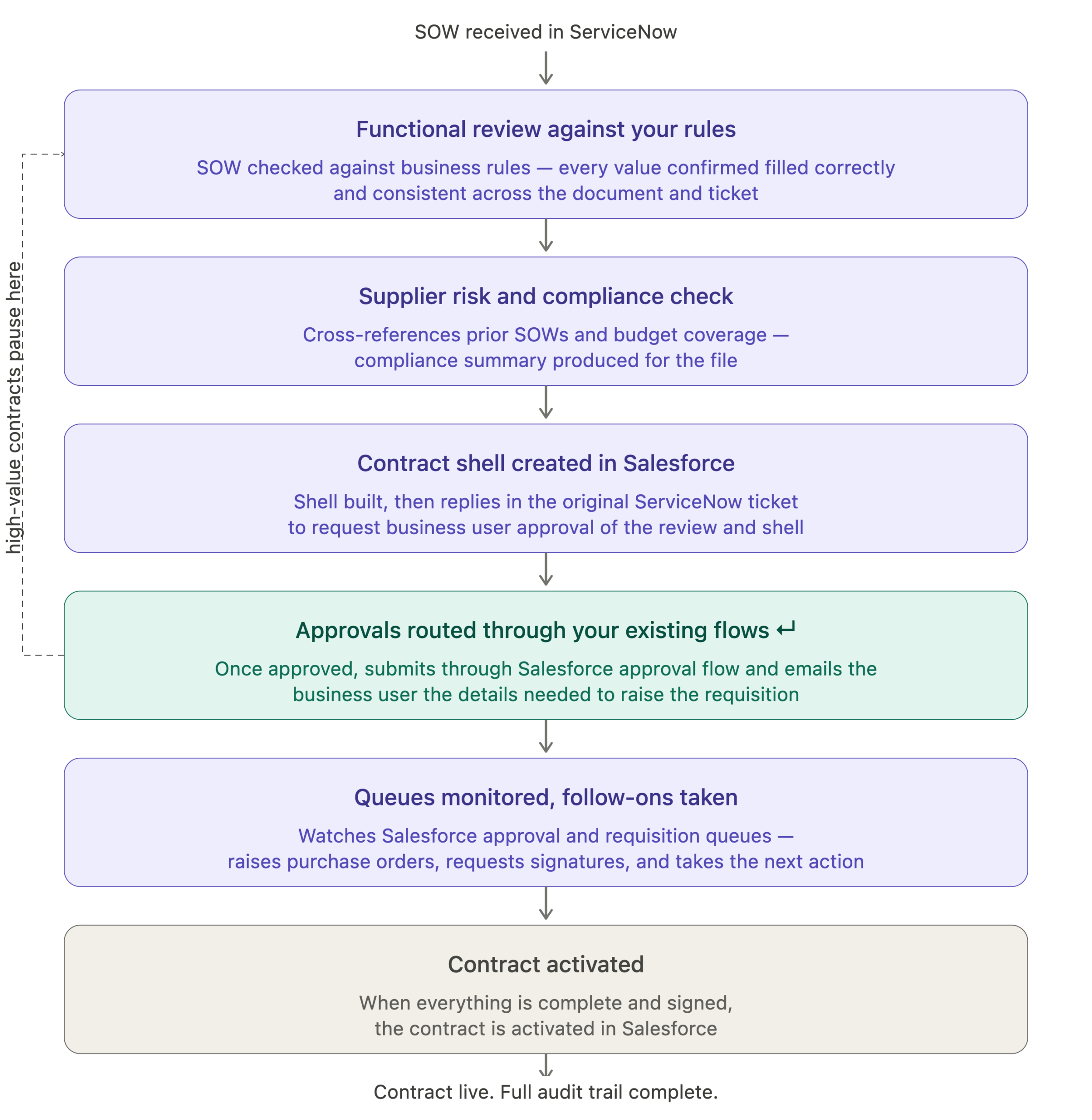
Every SoW is checked against prior SoWs and budget, then re-keyed into Salesforce and the requisition system. Each step is stitched together by email and waits on a chain of approvers.
Variances Stall in the Inbox
When an invoice doesn’t match the PO, the reason is in an email, not the ERP. The invoice sits unposted, the supplier goes unpaid, and buyers chase finance for answers.
Written-Off Stock Keeps Moving
SAP can’t flag a written-off batch, so it keeps getting consumed, sold or shipped. Nobody sees it until someone reconciles by hand, which takes two to three days every close.
What Changes With Digital Workers?
Requisitions in Days, Not Weeks.
Each ServiceNow ticket is checked against supplier, budget and approval rules. The PO is raised in Oracle and routed for approval, with no re-keying between systems.
Invoice Variances Explained.
Each invoice is matched to its PO, and the email behind any variance is found and attached. Once a reviewer approves, the PO is updated and the invoice posted.
Duplicates Caught Before Payment.
Every invoice is checked against payment history, the contract and the work order. Duplicates and out-of-contract billing are flagged for review before payment.
Written-Off Stock Reconciled.
Every written-off batch is reconciled against SAP, and journal entries are drafted for approval. Two to three days of close work finishes in minutes.
Digital Worker Example: Automating Requisition to PO
Takes the ticket from intake to PO:
- The team assigns the ServiceNow ticket to the Digital Worker, the way they would to a colleague.
Checks every request:
- Validates each SoW against prior SoWs, supplier records and budget, and flags anything that doesn’t match.
Raises the PO only once you approve:
- Creates the contract shell in Salesforce and the requisition in Oracle, then routes the PO to your approvers. No PO is created without human sign-off.
DATA READINESS
Blueprints:
blueprints
Automates procurement workflows: orchestrating full SoW lifecycles.
Matches invoices to POs, explains variances & posts for payment.
Resolves AR exceptions across systems, cuts DSO & frees cash.
Automates the reconciliation of every written-off product batch.
Digital Workers inside the procurement stack you already run
Illustrative coverage:
- ServiceNow - intake ticket and the team's coordination surface
- Salesforce - contract shell, approval flow and activation
- Oracle iProcurement (and equivalent P2P / requisition systems)
- Adobe e-signature / Acrobat Sign for signatures
- Email for business-user coordination and approvals
Offering Value Across the Supply Chain
COOs feel the weight of fragile supply chains most. Digital Workers automate high-volume workflows, procure-to-pay, vendor reconciliations, shipment tracking, so costs shrink and resilience rises. What once relied on offshore teams or buffer stock is now delivered in-house, at scale, and on autopilot.
Procurement leaders spend too much time untangling mismatched invoices, chasing approvals, and resolving vendor disputes. Digital Workers automate validation, approvals, and payments with full traceability. Cycle times shorten dramatically, disputes disappear, and supplier relationships strengthen.
Supply chains falter when visibility is delayed or incomplete. Digital Workers continuously ingest signals from ERPs, logistics systems, and market data to generate real-time views of inventory, shipments, and risks. Plans become predictive, not reactive—and stockouts or waste are prevented before they happen.
Ops teams shouldn’t spend nights buried in reconciliations and manual trackers. Digital Workers take that load—pulling data from multiple systems, reconciling automatically, and generating dashboards. Ops teams finally shift from data janitors to strategy drivers.
A global enterprise reimagined its procurement operations by deploying causaLens’ Procurement Workflow Digital Worker.
Before Deploying Digital Workers:
- 15 FTEs managing 2,300+ SoWs a year
- 6+ days to complete each SoW
- $600K+ a year spent maintaining RPA that failed in real-world use
After Deploying Digital Workers:
- SoW turnaround halved, from 6 days to 3
- 50% more SoWs processed
- RPA costs eliminated, with the team focused on strategic work and exceptions
Common Questions, Answered
-
RPA bots follow screen-level scripts that break on any change. Digital Workers reason about the SoW and the invoice, and a self-healing loop keeps them running when an underlying system changes.
-
Every requisition is checked against your supplier records, budget and approval rules before anything is raised. If a detail doesn’t match, the Digital Worker flags it with the reason, and no PO is created without human approval.
-
ERP controls match on invoice number and amount, so near-duplicates get through. The Digital Worker reads each invoice against payment history, the contract and the work order.
-
SAP has no concept of written-off inventory, so a written-off batch keeps being consumed, sold or shipped. The Digital Worker reconciles every batch against SAP movements and resolves it to consumed, sold, R&D or untouched.
-
No. A person approves before any PO is created, any invoice is posted or any journal entry is booked.
Pick 1 process. Give it 2 to 3 weeks.
Bring the requisition queue, the invoice backlog or the write-off reconciliation that costs your team the most days this month. We will scope it, build it and run it against your systems.