
Every invoice matched, explained and posted - without a finance FTE working the queue.
It reads each invoice, matches it against the purchase order in the ERP, finds the email trail that explains any variance, and returns a recommended resolution for a human to approve - then updates the PO, posts the result back, and moves to the next one until the backlog is gone.
Customers automating their workflows













Invoice processing is a queue that grows faster than the team working it
Every invoice is a manual check
Tens or hundreds of vendor invoices sit in ServiceNow waiting for someone to work them. A finance FTE opens each one, finds the matching purchase order in the ERP, compares the amounts, and only then can post it for payment. The work is identical every time and it does not scale with volume.
A variance is where the process stalls
When the invoice does not match the PO, the check becomes an investigation. The reason is almost never in the ERP. It is in an email: a last-minute change to the order, a supplier confirmation, a buyer approval. So the invoice sits, unposted, while someone searches an inbox - or it gets escalated, queried with the vendor, and parked for days.
The CFO cannot see the spend
While invoices sit unposted, the spend they represent is not in the P&L. Accruals are estimates, period-end is a reconciliation exercise, and the finance leadership team is making decisions against a picture of spend that is always incomplete and always behind.
What Does This Digital Worker Do?
The whole backlog, in one trigger
- Allocate the backlog and trigger the autonomous workflow.
- The Worker navigates every system in the process - Outlook, ServiceNow and the Oracle ERP - so each invoice is investigated with full context, not matched against a single field and flagged when it fails.
Variances explained, not just flagged
- When an invoice exceeds the authorised purchase order, the Worker identifies the variance and then goes and finds the reason for it: the supplier email confirming the change to the order, the buyer approval that authorised it.
- What reaches a human is a recommendation with its evidence attached.
Approve, reject, or steer
- The reviewer approves, rejects, or adds context to guide the Worker.
- On approval it updates the purchase order in the ERP, posts the result back, resolves the invoice and moves to the next one - until only the exceptions that genuinely need a human are left.
blank space
Demo of the Digital Worker:
The invoice, the purchase order, the variance and the emails that explain it - on one screen
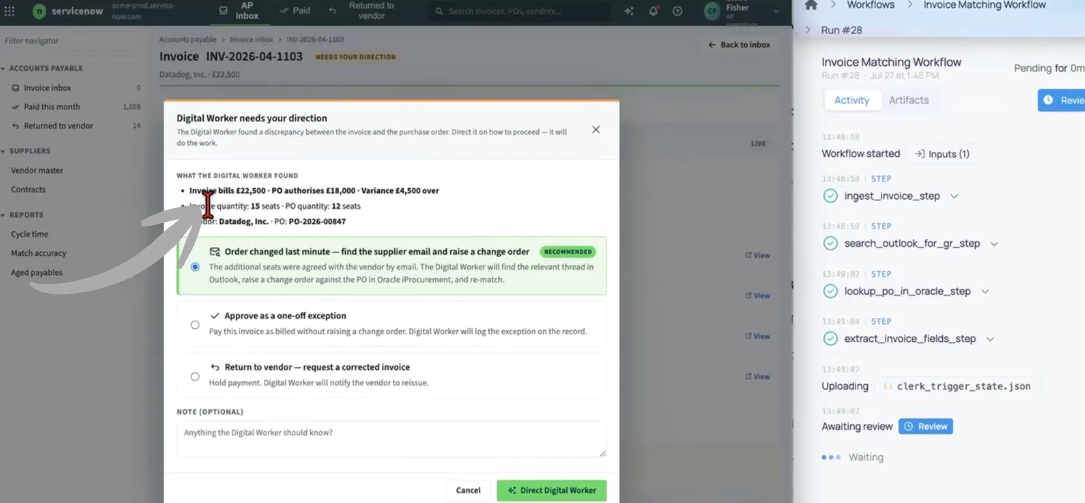
- The Invoice Processing Digital Worker is built for the accounts payable and finance operations team, not for engineers.
- It sits across your intake system, your ERP and your email, investigates every invoice end to end, and presents a recommended resolution with the correspondence that supports it - with a human approving before the PO is changed or the invoice posted.
Built on the core capabilities of the causaLens Digital Worker platform
The Invoice Processing Digital Worker is a multi-agent system, governed end-to-end by the capabilities that underpin every causaLens Digital Worker. These are what make the difference between OCR with a rules engine bolted on and a Worker finance lets post to the ledger.
Core Architecture:
- The capability that separates causaLens Digital Workers from copilots and brittle automation.
- Its self-healing loop writes the automation, runs it as code, and when that code errors - an ERP API version change, an expired mailbox credential, a moved field in the intake system - the Worker inspects the failure and patches the script to keep the queue moving, saving the fix for next time.
- Human-in-the-loop gates sit in front of every purchase order change and every posting, hard-stop guardrails halt agents that drift, and provenance tracking makes each recommendation auditable back to source.
Integrations:
- Service management and invoice intake - ServiceNow and equivalents
- Your ERP - Oracle and others - for purchase orders, goods receipt and posting
- Email and calendar - Outlook and equivalents - for supplier and buyer correspondence
- Vendor master data, payment terms and approval thresholds
- Purchase requisitions, change orders and buyer approvals
- Invoice documents and attachments, including PDF and scanned formats
- Your data warehouse as the reporting layer for spend and accruals
What It Replaces & Reduces:
- Line-by-line manual matching of invoices against purchase orders
- Inbox archaeology to find the email that explains a variance
- Invoices parked for days while a query sits with a vendor or a buyer
- Accrual estimates standing in for spend that has already happened
- Cost per invoice that scales with invoice volume
- Escalations for variances that were properly authorised all along
Common questions, answered
No. The Worker investigates, explains and recommends. A reviewer approves, rejects, or adds context before any purchase order is changed or any result posted to the ERP. The human-in-the-loop gate is part of the platform, not a setting.
Capture tools read the document and match on fields. When the invoice and the PO disagree, they flag it and hand it to a person. This Worker treats the variance as the work: it finds the change order, the supplier confirmation and the buyer approval that explain the difference, and returns a resolution rather than an exception.
It reaches a human as a genuine exception, with the investigation already done - the systems checked, the correspondence searched, the possible causes ruled out. Real problems surface faster because they are no longer buried in routine matching work.
The target is close to 100% on invoices that have a valid explanation available in your systems, with only genuine exceptions routed to a human. The achievable rate depends on your data quality and how consistently approvals are recorded; we scope it against your actual invoice population during the MVP.
Every step is captured in an audit trail: what was extracted, from which system, which correspondence was relied on, what was recommended, who approved it, and what was written back. Provenance tracking runs end to end, which is what makes the Worker acceptable to controllers and external audit.
Yes. The Agentic Data Mesh is a query layer, not a point-to-point integration, so additional ledgers, entities or ERP instances can be added without re-writing the workflow.
Yes. We deploy on causaLens cloud, your private cloud, or fully on-premise. The Worker is model-agnostic - use our default model, or bring your own approved LLM. Your financial data never leaves your environment unless you choose otherwise.
Typical timeline: an MVP in two to three weeks against a small, high-value scope, followed by a production deployment scoped to your data, security and integration requirements. A dedicated causaLens AI engineer builds and runs the Worker; a causaLens value engineer owns project success.
Production-grade, not prototype
Versus the manual, invoice-by-invoice workflow
A finance FTE checks every invoice against its purchase order by hand and stops dead when the two disagree. The Worker does that matching at volume, investigates the variances itself, and hands a reviewer a decision instead of a research task. Throughput stops being a function of headcount.
Versus OCR and rules-based matching
Rules clear the invoices that already match - which was never the expensive part. The cost sits in the variances, and rules cannot read a supplier email or recognise a buyer sign-off. This Worker is built for exactly that residual.
Versus generic LLM tools
A generic model cannot be trusted to read a ledger, interpret an approval chain and change a purchase order. This Worker keeps financial data in typed, auditable structures, QAs its own reasoning, gates every write behind human review, and tracks provenance end to end.